Check the 1.0.60.0 area-specific destinations
The October 30 patch 1.0.60.0 notes distinguish these destinations:
- Ordinary dry ground: near the recorded death position.
- Eel boss area: the adjacent room.
- Three-pipes area: surrounding rooms, avoiding the floors above and below.
- The specified clock chamber: a dry room beside the clock.
Confirmed death packs on the eel roof, under the three pipes, on the clock roof or stone, and in fungi water recover on load with contents preserved. If all clock destinations are blocked, recovery waits for free space and tries again. Packs already on legitimate nearby dry ground or in the playable room below the three pipes are not moved.
Elevated Crypt reachability remains under investigation. Some old-save positions cannot safely be determined. Loose items behind fungi walls are not covered by the confirmed death-pack recovery. These are specific fixes, not a promise to restore every loss; do not edit a save or repeatedly die to trigger recovery.
Start with what happened just before the loss
Historical 1.0.50.0–1.0.51.0 context: check the 1.0.60.0 area-specific branch first.
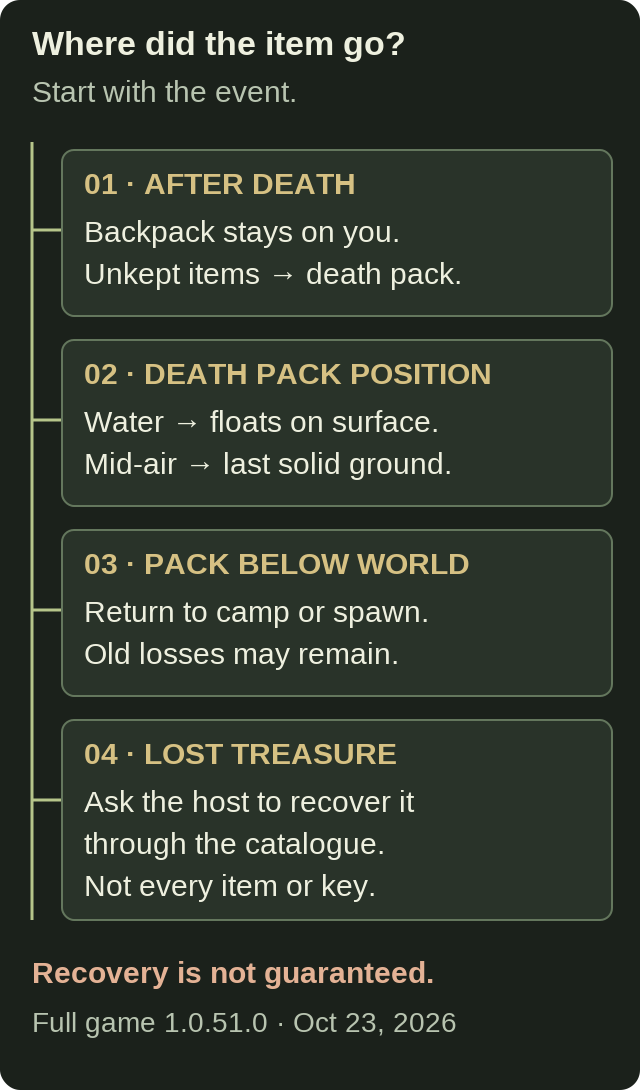
First check whether the missing object is still in your equipped backpack or is among the items sent to the death pack. A death pack in water, one created in mid-air and a pack below the world now have different recovery behavior.
The 1.0.51.0 position fixes add to the 1.0.50.0 backpack rework. The older 1.0.47.0 water, partial-stack and switch fixes are historical context, not a reason to search every current death pack along the shore.
Death pack in water: check the surface
Historical 1.0.50.0–1.0.51.0 context: check the 1.0.60.0 area-specific branch first.
- Update to 1.0.51.0 before retrying the relevant failure.
- For a death pack in water, check the water surface. The patch makes death packs float and follow ground level.
- When you find the pack, check the contents before continuing.
Older 1.0.47.0 behavior: backpacks and death packs entering water were changed to wash ashore. Keep that dated rule separate from the new death-pack surface behavior. The notes do not establish that every dropped ordinary backpack now floats, an exact bank or delay, or recovery of an already lost object.
Do not use Starve to Death as a recovery trick: it is a real death, and items you do not keep go into a death pack.
Mid-air or below the world: check the matching destination
Historical 1.0.50.0–1.0.51.0 context: check the 1.0.60.0 area-specific branch first.
- Death pack created in mid-air: 1.0.51.0 makes it fall to the last solid ground. Check that last solid surface rather than only the airborne death position.
- Backpack or death pack below the world: the patch returns it to camp or the spawn point. Check those destinations if the pack fell through the world.
- A carried backpack falls through terrain: the patch also fixes this specific failure. A current repeat should be reported with the displayed version and location.
These changes do not guarantee restoration of every pack or item already lost. They do not change the rule that your worn backpack stays with you after death.
An item vanished when topping up a partial stack
Patch 1.0.47.0 addresses item loss when adding to a stack that already contains some items. Check that the game has received the relevant update before repeating a large transfer, and watch the item counts as you organize supplies.
If an ingredient has already vanished, do not assume it moved into a death pack unless a death also occurred. Record the transfer and missing count for a support report.
Contents changed when you switched backpacks
Patch 1.0.47.0 addresses contents being swapped or duplicated when changing backpacks. Check the pack you have equipped and the other pack involved before moving on, so you can identify which contents are actually missing.
For capacity upgrades instead, use the Pouch and Backpack recipes.
After death: check your worn backpack and the death pack
Historical 1.0.50.0–1.0.51.0 context: check the 1.0.60.0 area-specific branch first.
In 1.0.50.0, the backpack stays on the player and items not kept go into a bigger death pack. Check the equipped backpack first, then search for the death pack. In 1.0.51.0, use the water-surface, last-solid-ground or camp/spawn branch above if its position is the problem.
The October 15 sewer-bat discussion reports missing worn backpacks under the older behavior, including with water drained. Its exact build is unknown; it is historical evidence of a bug, not the normal death model introduced in 1.0.50.0.
If the current result differs, note your platform, displayed version, death location, water involvement and missing contents, preserve the original save and contact Raw Fury support.
Lost a treasure? Ask the host to use the catalogue
Patch 1.0.50.0 lets the host recover a lost treasure from the catalogue, wherever it ended up, including another player's inventory. Ask the host to try this for the missing treasure before considering a save edit.
This is treasure recovery, not a promise to restore every item or every key. If the missing object is not covered, use the support-report details above. See the host controls for the related co-op changes.
Historical community save workaround: preserve the original first
For older missing-backpack cases, Nicko Vin's accepted community reply describes relocating an existing backpack object in a Windows local save; two other players reported success. This predates the 1.0.50.0 death rework and is not independently tested by this guide. Try the host's catalogue option first when the missing object is a treasure.
Back up the untouched save before considering any edit. Editing the wrong object or coordinates can damage progress or affect another player's pack. For multiple backpacks, another platform or an unclear object, contact support before editing.
Sources
1.0.60.0 area-specific recovery first; older rules remain dated context. No universal restoration guarantee.
Version and source details
Full-game 1.0.60.0 notes dated October 30 describe specific death-pack placement and recovery. Older 1.0.50.0–1.0.51.0 rules and 1.0.47.0 reports below are historical context, not a new gameplay test or Demo/console rollout confirmation.